
Main Window
Navigate the main application window
The main Speakly window provides access to all features and your transcription history.
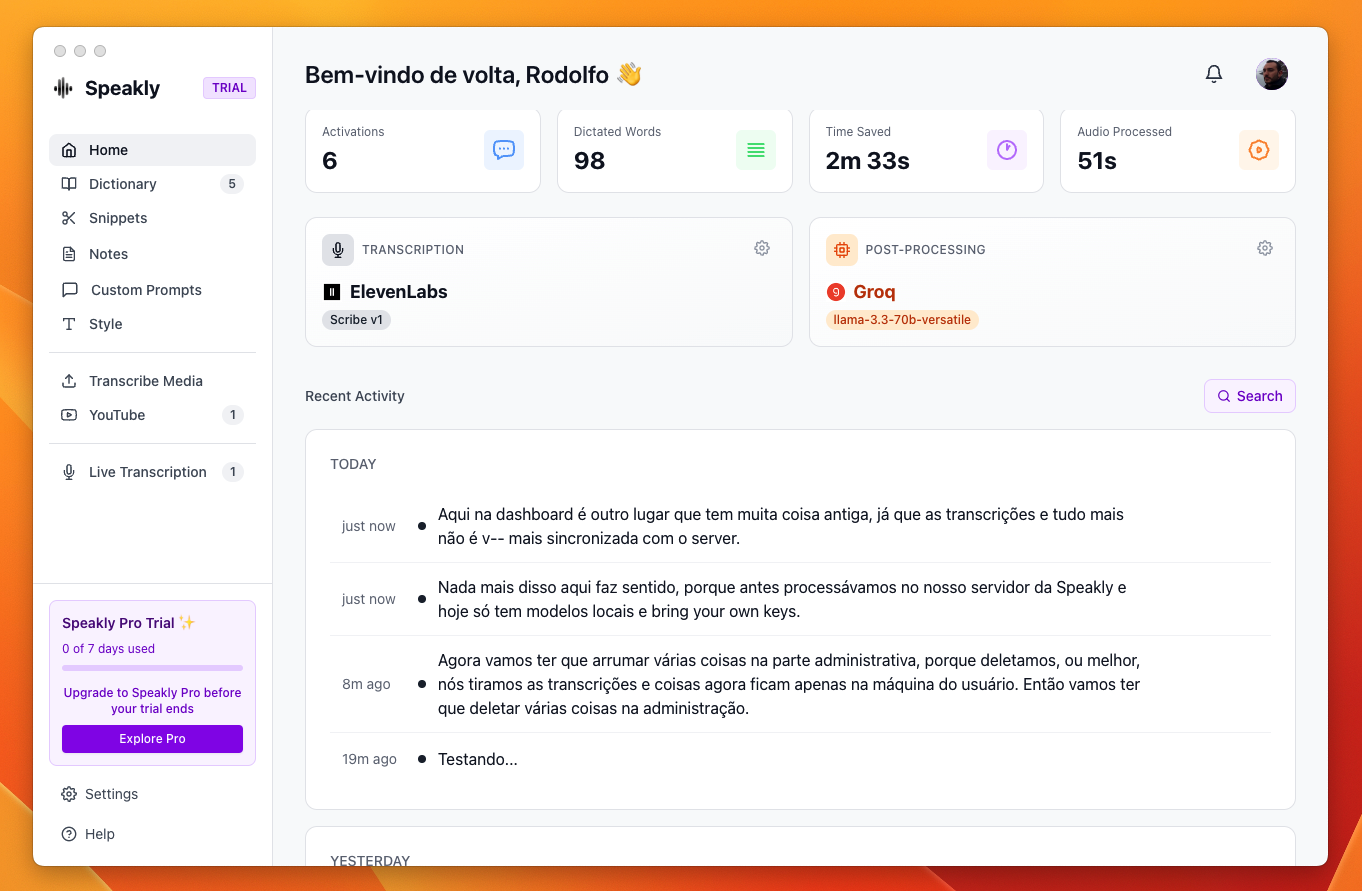
Your Voice Pipeline

The home screen shows the path every recording takes: a Transcription card and an optional Post-Processing card. Each names the engine and model in use, carries a gear to change it, and lists the features that act at that stage.
Remaining quota
Next to the model, each stage shows what is left on that provider — credits, balance or rate-limit headroom. It stays grey while there is plenty, turns amber below a fifth, and red when the provider has actually refused a request, naming the limit and when it lifts. Hover it for the detail.
What can be shown depends on the provider. ElevenLabs, Deepgram and OpenRouter publish a real balance, read from a free endpoint. Groq, OpenAI and Anthropic report headroom only on the response to a real request, so the figure appears after your first dictation. Google Gemini, Mistral and Cerebras publish nothing at all — those stages show what Speakly itself counted, priced with published per-minute rates and labelled an estimate.
Recent Activity
Under the cards, Recent Activity lists your recent dictations, newest first. Hover a row and its actions appear on the right: play the saved audio, re-transcribe it, copy the text, delete the entry.
Re-transcribe with the current model
The circular-arrow button on a row — its tooltip is Re-transcribe with the current model — runs that dictation's saved audio through the transcription engine and model set right now. It is meant for text you dictated with an older or weaker model: switch the engine in Settings → Transcription, then re-transcribe the entry. While it works, a small label and progress bar take the button's place (Preparing… / Part x of y / Transcribing… / Finishing…), and the new text appears in the row when it finishes.
- The button only appears when that dictation's audio is still on disk. Audio is kept only with Keep audio recordings on in Settings → System; with it off, past dictations cannot be reprocessed. If the file was deleted afterwards, the button is gone too.
- The new text replaces the old one in place — no second entry is created, and the previous wording is not kept.
- It never replaces your text with nothing: if the model returns an empty result, the previous text stays and Speakly says so.
- It does not move your lifetime totals in Settings → Statistics. The words were dictated once, and transcribing the same audio again is not new dictation.
- It re-transcribes with your Dictionary and your Writing Style, but it does not re-apply a Custom Prompt: custom prompts are chosen by the app you were dictating into, and there is no such app when you reprocess an entry later.
Navigation Tabs
- Live Transcription: Real-time transcription view
- Transcribe Media: File upload and YouTube video transcription
- Custom Prompts: Manage your AI prompts for text processing
- Transforms: Rewrite the text selected in any app with ⌥ and a digit
- Style: Choose output style (Formal, Casual, Very Casual)
- Notes: Quick notes storage
Quick pickers in the header
Two small buttons sit at the right end of the header, before the notification bell. Hover either one and its tooltip says what it is set to.
- Microphone — the device dictation records from. The tooltip reads
Microphone: <device>(or System default), and the button opens the same picker as Settings → Microphone. - Language flag — the language your dictations are written in; opens the same picker as Settings → Languages.
Account menu (top right)
The round avatar at the right end of the window header opens the account menu; the notification bell sits next to it.
- Name, e-mail and plan badge — the badge reads PRO, TRIAL or EXPIRED, following your billing status. While the status is still loading, no badge is drawn.
- Free Trial — during the trial: the days remaining and a Get Pro - $20 button that opens Settings → Plans and Billing.
- Trial Expired — after the trial: the note “Upgrade to continue transcribing” and the same Get Pro - $20 button.
- Manage account — the only entry in the menu. It opens Settings → Account.
This menu has no Settings, Help or Sign out entry. Sign out is on the Account tab in Settings, and Help has its own menu at the bottom of the sidebar.
Help menu (bottom of the sidebar)
Help sits at the bottom of the left sidebar, directly under the Settings button, and opens upwards in two groups:
- Essentials — Shortcuts (the keyboard-shortcut view), Microphone (device picker) and Languages (output-language picker).
- Get in touch — Help Center opens tryspeakly.com/docs in your browser; Talk to support and General feedback open the in-app Report an issue dialog, on its issue tab and on its feedback tab.
Notifications
The bell in the top right of the header opens Speakly's notification panel, titled Notifications. The entries come from Speakly's server — announcements, feature notes, warnings — not from your own activity. A red dot on the bell means something is unread.
- Click a notification to mark it read; if it carries a link, the click follows it — an external link opens in your browser, an internal one goes to the matching screen
- The filter icon switches between New and Archived
- The ⋮ menu offers Mark all as read and Archive all
- Hover a single notification and click Archive to file just that one
With nothing pending, the panel reads All caught up!. Because the list comes from the server, it stays empty while you are offline.